
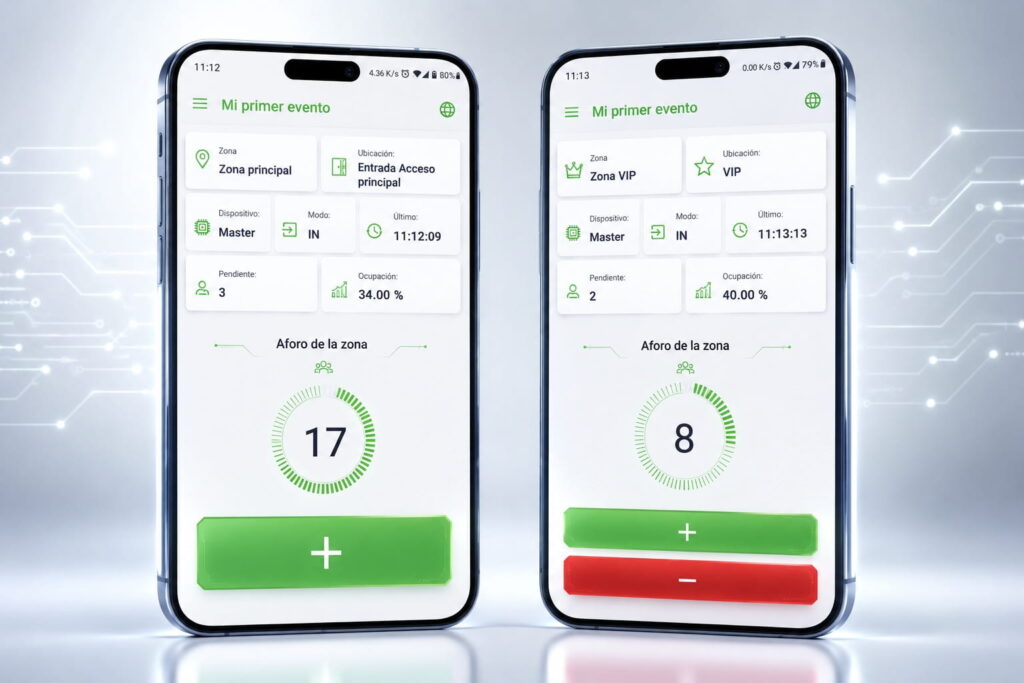

We count everyone who comes in and goes out of your event, venue or store, and you see the occupancy in real time on your phone or computer.
Every entry and every exit is recorded as it happens and added up on an online dashboard. You and your team see the live occupancy from any device.
1. We choose how to count
If your event has no tickets, we count with Clicker Pro: at each door, staff press a button for every person who comes in or goes out. If there are tickets or wristbands (with a code or NFC), occupancy comes from the scanning itself, since we also scan people on the way out.
2. Everything adds up to the same capacity
You can have devices at several doors, and they all count toward the same capacity. With Clicker Pro, each area of the venue can also have its own capacity, and people moving from one area to another aren’t counted twice.
3. You see it wherever you are
The dashboard opens on your phone or computer. You can share a link to the occupancy report with whoever needs it, for example the security team.
4. You know when it’s filling up
With Clicker Pro, the number changes color as the venue fills up and the app alerts you when it reaches the maximum. It doesn’t lock: it keeps counting, so the number is always accurate.

Clicker Pro
For events without tickets. It’s our people-counting app, like the classic hand tally counter but on a PDA or Android phone and connected to the dashboard. At the door, staff press the green button when someone comes in and the red one when someone leaves. It can be used by our staff or yours.

Ticket and wristband scanning
For events with tickets or wristbands, with a code or NFC. We scan them at the door with Exyt Events+, our access control system, and again at the exit. Occupancy is calculated from those scans, with no extra system to install.
Custom permanent installations
We only consider people-counting sensors and cameras for permanent venues that need to count every day with nobody checking the entrances, like a shopping center or a museum, and always as a custom project. We don’t recommend or offer them for events, not even as a temporary setup: there, the figure comes from Clicker Pro or from ticket scanning with exit reads.
Trusted by event organizers
More than 1,000 events managed: festivals, conferences, graduations and sports competitions
Exyt Control’s capacity control service tells you how many people are inside an event, venue or site at any moment. It works for festivals, concerts, conferences and trade shows, and also for stores on very busy days. We count with Clicker Pro or by scanning tickets, and you watch it live.
Each phone or PDA is set up by scanning a QR code, and it’s assigned to its door, its area and what it counts: entries, exits or both. From then on, staff just tap a button. If the signal drops, it keeps counting and sends the data when it comes back.
Yes, if they’re Android: we install the app and set them up with a QR code. It doesn’t work on iPhone. If you prefer, we bring our own PDAs.
We scan each ticket or wristband on the way in and again on the way out. The dashboard subtracts the exits and tells you how many people are inside. Anyone who leaves can come back in with the same ticket. It’s the same system we use for our access control.
No. Clicker Pro only adds and subtracts button presses; it doesn’t know who is coming in. With ticket scanning, the capacity comes from the scans of the tickets your event already has. Neither one uses images or recognizes anyone.
We set up the system, stay on call during the event and fix any issues that come up. If your own staff use the clicker, we give them some simple instructions beforehand.
Real-time capacity control for venues, stores and halls, including one-off busy days like a sale or a product launch.
We scan tickets or wristbands on the way in and out, so you know how many people are inside at any moment. If the concert is free and there are no tickets, we count with Clicker Pro.
One capacity for each room or hall and another for the whole venue, with Clicker Pro at the doors. That way you know which room is filling up.
Tell us about your event
We’ll get back to you as soon as possible.